You can now photograph jewelry that has not been manufactured yet.
The NeuroViz 3D CAD Visualizer opens your jewelry CAD file in the browser, lets you line up the angles you want, and returns finished photorealistic product photos. No sample, no photographer, no studio. It works in reverse too: one photo of a real piece comes back as a 3D model.
If you design in CAD, this changes the order of operations for your whole catalog. You no longer photograph what you have manufactured. You photograph what you have designed, and manufacture what sells.
Everything in this guide is on the 3D CAD Visualizer page: formats, render models, gemstone cuts and pricing.
How do you turn a CAD file into product photos?
Five steps, and the first two cost nothing.
Open your file. JewelCAD, Rhino, STL, OBJ, GLB and other common 3D formats, up to 60 MB. What loads is a real 3D viewer, not a static preview: right mouse button to orbit the piece, scroll to zoom. The viewer reads your file and tells you what it found, down to the part count, the number of stones and the physical dimensions in millimetres.
Pick your angles. Front, top, side, three-quarter and back are prepared for you automatically. If none of them shows the piece the way you want it, rotate to the view you like and hit Snapshot. Select up to four views and each one becomes its own variation, so a single generation returns four finished photos from four different angles.
Loading a model and setting up views doesn’t generate anything and doesn’t cost credits. You only pay when you render.
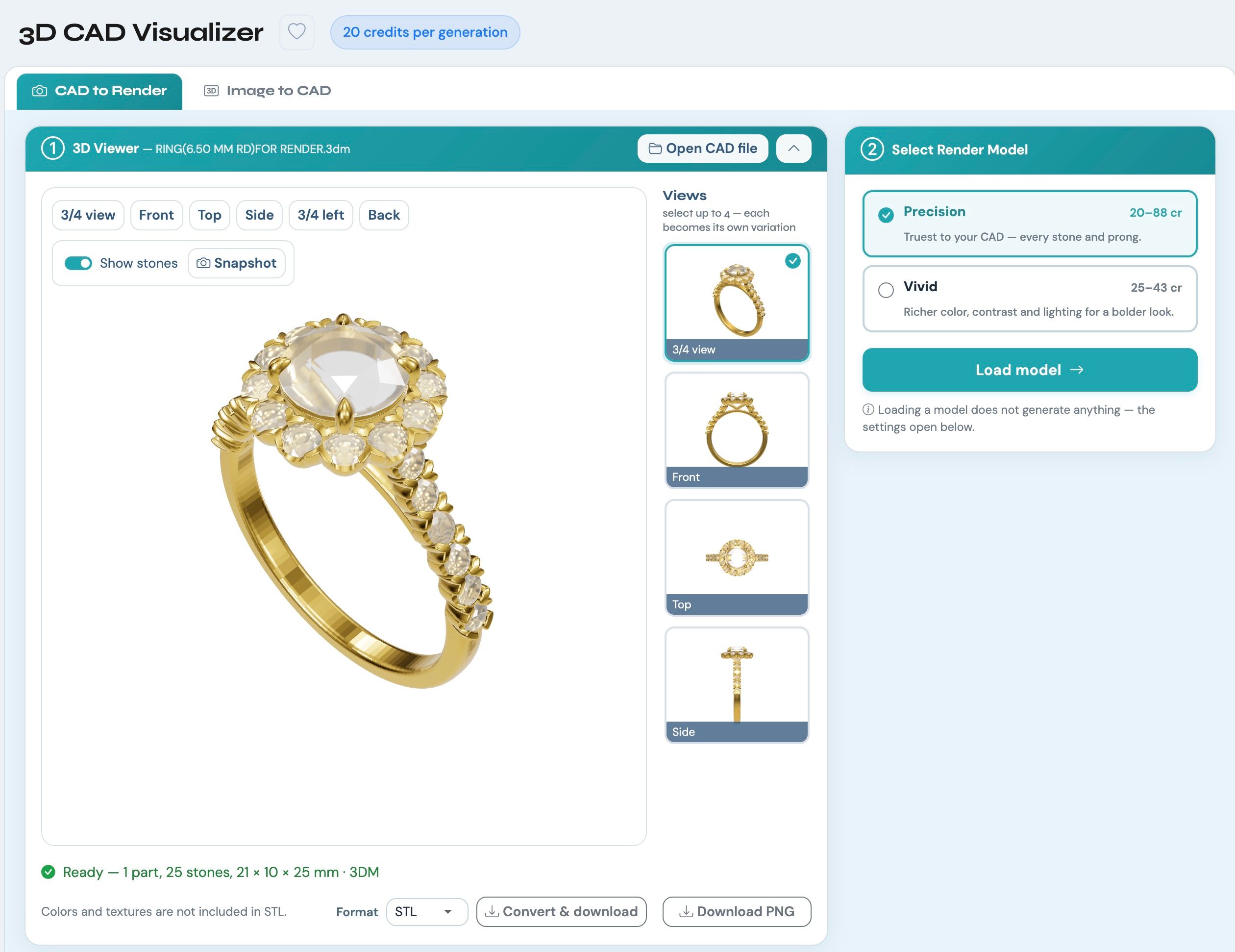
The 3D CAD Visualizer viewer with a halo ring loaded, four prepared camera views in the side panel, and the Precision and Vivid render models
Choose the render look. Precision stays true to your model: every stone, prong and proportion exactly as you built it. Vivid pushes colour, contrast and lighting for ads and social.
Precision also carries a toggle that only makes sense to people who actually work in CAD. Models are often built with prongs open and upright, the way they sit before the stones are set. Switch the toggle off and the render closes them over each stone, so the piece looks manufactured instead of mid-production. Leave it on and your prong tips are reproduced exactly as modelled.
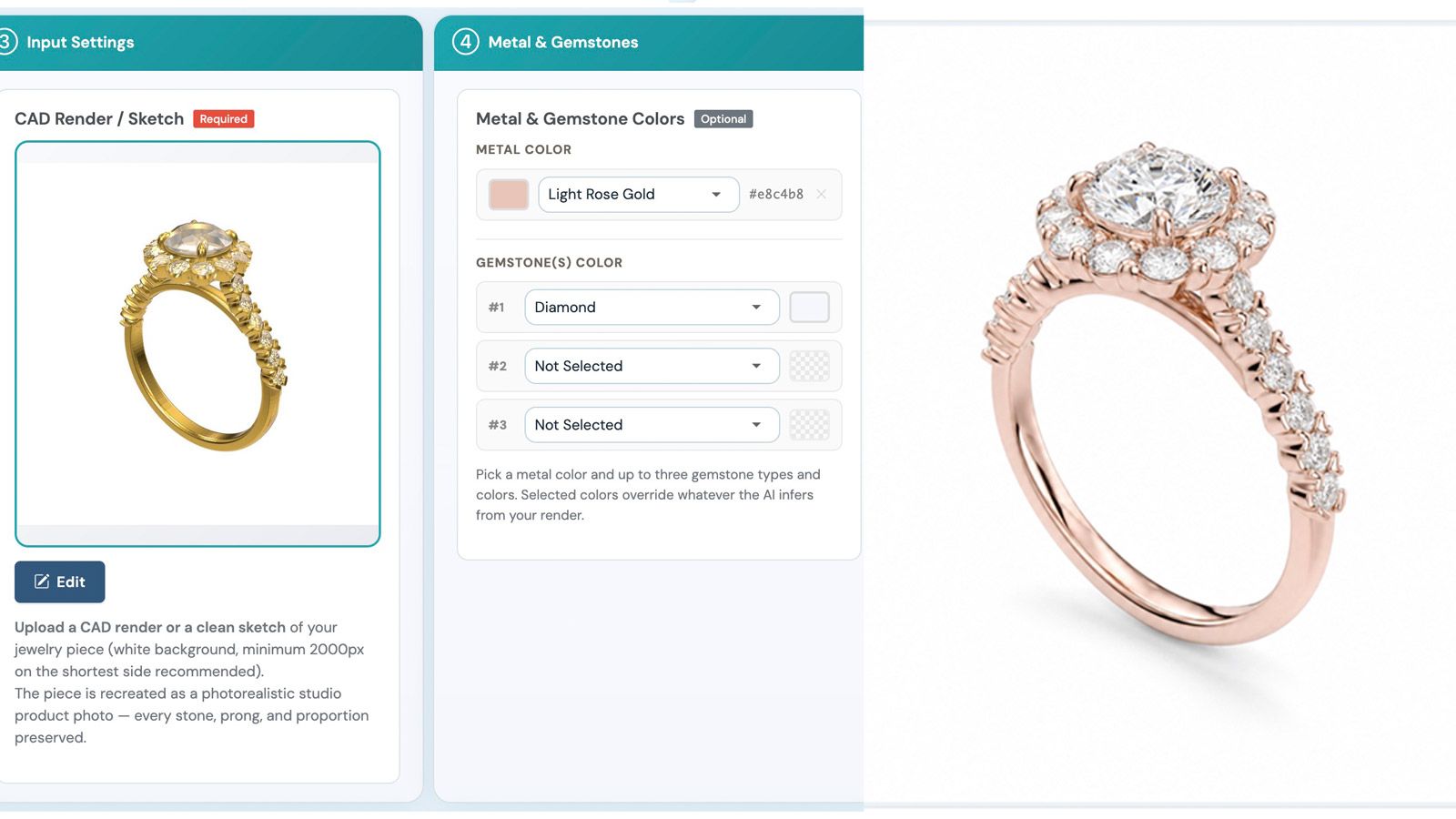
Set the metal and the stones. You pick the metal colour and up to three gemstone types with their own colours, and your choices override whatever the AI would have guessed from the geometry. Diamond, emerald, ruby, sapphire, amethyst, aquamarine, topaz, citrine, peridot, garnet, opal, pearl, tanzanite, morganite, tourmaline and onyx are all in the list. The colour library lives in your settings, and Pro members can build their own: company colours, specific metal names, anything you use often.
This is the part that surprises people. The metal in your CAD file is not the metal in your photo. The same model renders as yellow gold, white gold and rose gold without touching the file.
Set the output. Resolution runs from 1K to 4K, on white, on any solid colour, or transparent. Aspect ratio, JPEG quality and DPI are there if you need them, but the defaults are set sensibly and most runs need nothing changed.
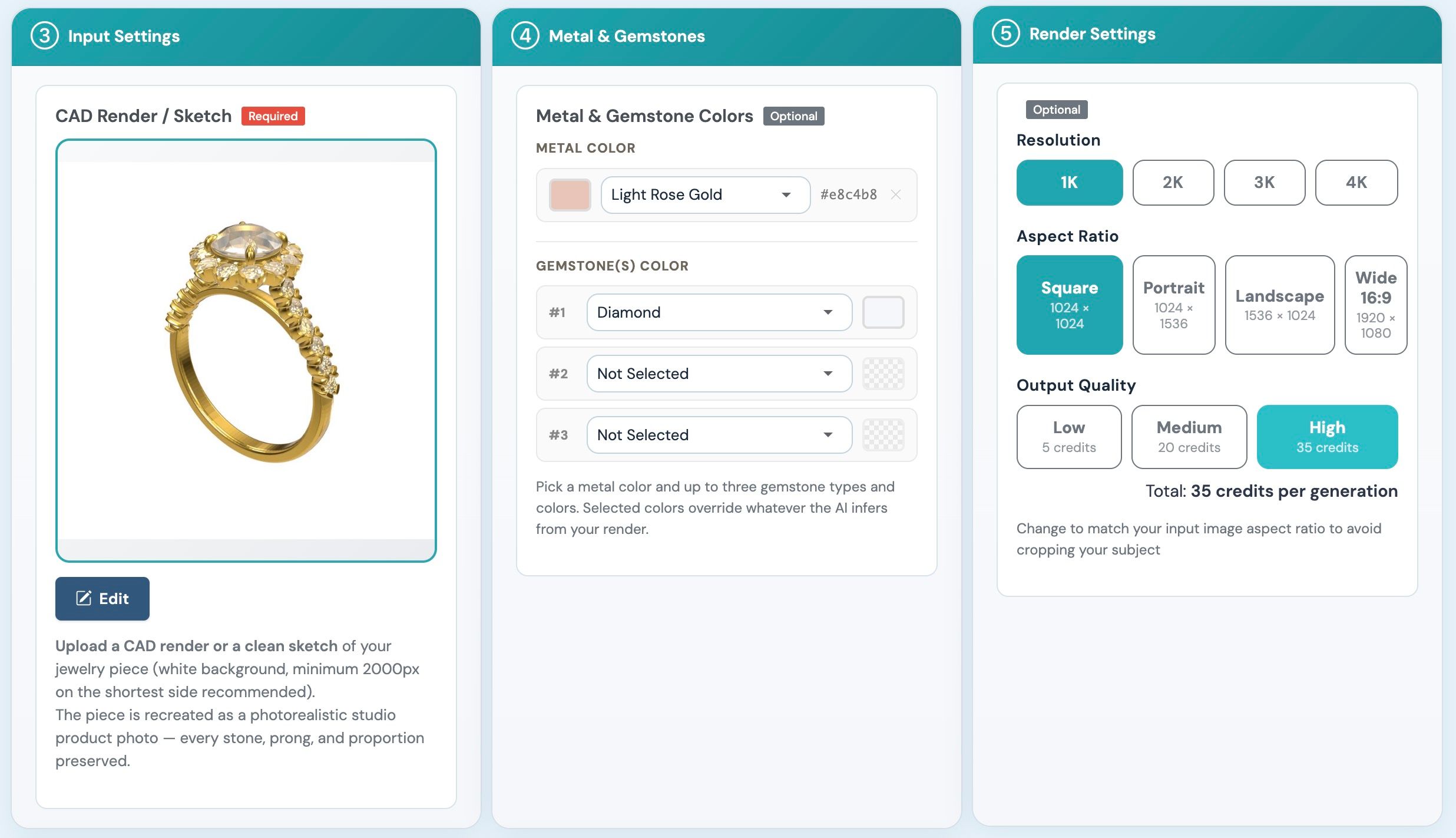
Render setup showing the metal and gemstone colour pickers set to Light Rose Gold and Diamond, next to the resolution, aspect ratio and output quality controls
What does a render cost?
Precision starts at 5 credits for a 1K render at Low quality and runs 20 credits at the default High setting, which is what most catalog work uses. Push it to 4K and it runs 60 credits at High or 85 at Max. Vivid starts at 25 credits. The full grid of five quality levels by resolution is in our guide to the new output controls.
At volume pricing that puts a typical Precision render at around $0.40 and a Vivid render at $0.50. Current rates are on the NeuroViz pricing page.
Two things that don’t cost anything: opening a file, and converting it to another format. And if you are a Pro member, regenerating a render you weren’t happy with runs at roughly a third of the original price.
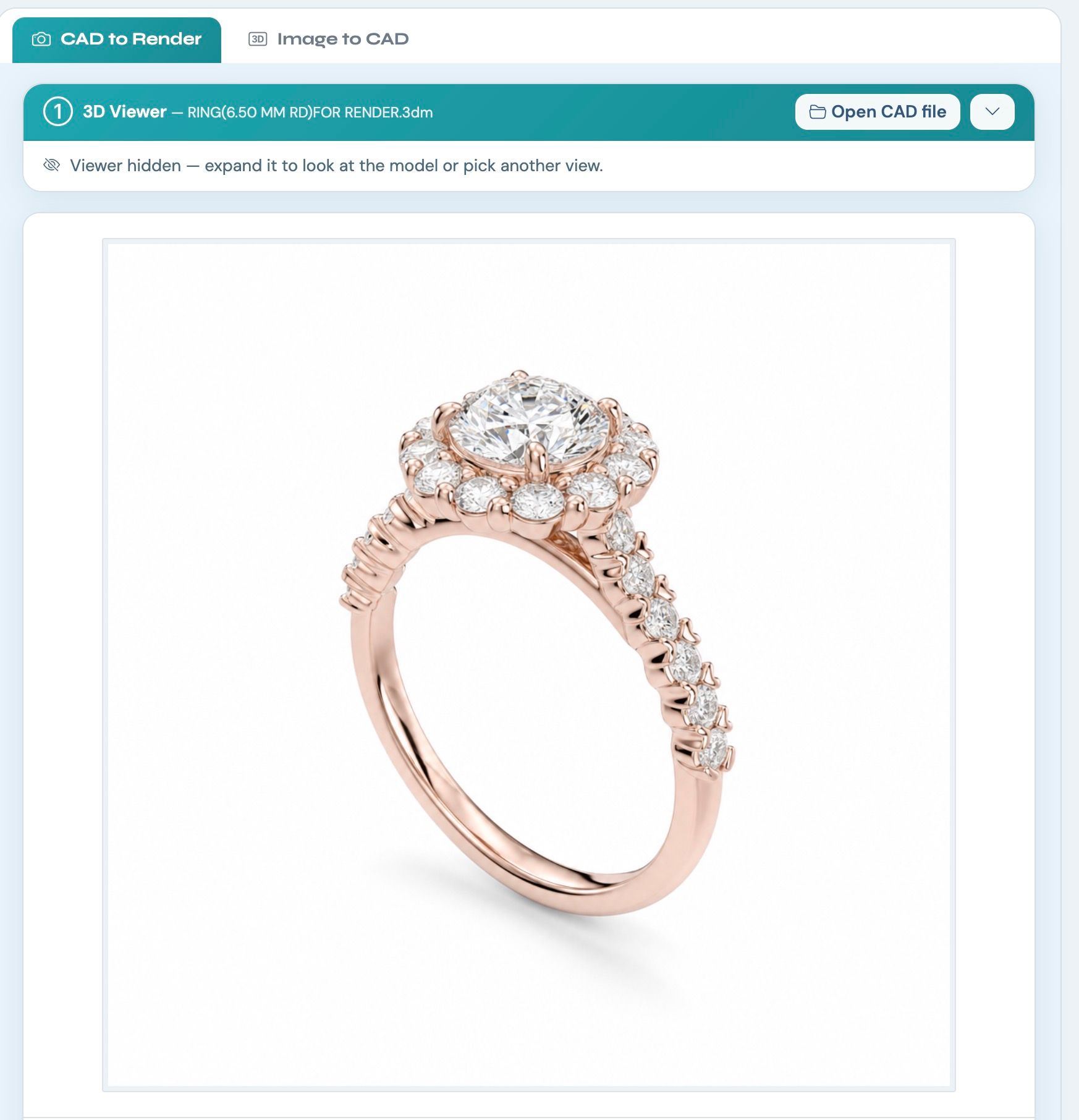
Finished render of a rose gold halo ring with a round centre diamond and pavé shoulders on clean white
What this actually unlocks
A catalog before manufacturing. Photograph made-to-order designs that exist only as files. Render an entire collection straight out of your CAD library in an afternoon. Show a client their bespoke piece finished, in the metal they asked about, before a single gram of gold is cast.
Variants without samples. A retailer asking whether the halo comes in rose gold used to mean a conversation. Now it means one render.
Photos of pieces you never shot. Sold out, shipped, returned to the client, sitting in a vault on another continent: if the CAD file exists, the photo exists.
Can you go the other way, from a photo to a 3D model?
Yes. The second tab reverses the flow. Upload one photo of a piece and a 3D model comes back, usually in one to three minutes. Spin it, download it, or send it straight back through the renderer to shoot it from angles you never actually captured. Quality tiers are Standard at 60 credits, High at 75 and Ultra at 90.
One thing worth being straight about. What comes back is a mesh: a detailed, textured 3D surface you can view, render and 3D print. It is not an editable parametric CAD file, and it carries no real-world dimensions, so set the size yourself before printing or casting. Treat it as a highly accurate visual model and a reference for a CAD modeller, not a replacement for CAD.
Nobody can reliably rebuild true CAD from a single photograph today. We would rather say that now than have you find out later.
It is also a free format converter
Anything you open can be downloaded as STL, OBJ, GLB or 3DM, at no charge. Open a JewelCAD file and hand a colleague a Rhino file. Send an STL straight to your printer. One note: colours and textures don’t travel inside STL, which is a limitation of the format rather than of the tool.
Every file you open is saved to your CAD library automatically, so you can pick it up again from any device.
From render to on-model photo
The renders don’t have to be the end of the chain. A finished render behaves like any other product photo in NeuroViz, which means you can send it straight into jewelry virtual try-on and put a piece that has never been manufactured onto a model’s hand, ear or neck.
Design in CAD in the morning, publish the on-model campaign shot in the afternoon, decide whether to manufacture it based on what happens next. That is a genuinely new order of operations for a jewelry business.
Where to find it
In the sidebar under Jewelry Suite: 3D CAD Visualizer. One screen, two tabs: CAD to Render and Image to CAD. In AI Studio it sits in the 3D CAD category.
For developers, both render models are available through the API. The photo-to-3D tool is app-only for now.
Frequently asked questions
Which CAD file formats does it open?
JewelCAD, Rhino 3DM, STL, OBJ, GLB and other common 3D formats, up to 60 MB per file. Anything you open can also be converted and downloaded in STL, OBJ, GLB or 3DM at no charge.
Does it cost credits to open a file or set up views?
No. Loading a model, orbiting it, taking snapshots and converting formats are all free. Credits are charged only when you render.
How many photos do I get from one generation?
Up to four. You select up to four views in the viewer and each one becomes its own variation, so a single run returns four finished photos from four different angles.
Can I change the metal colour without editing the CAD file?
Yes. Metal colour and up to three gemstone types are set at render time and override whatever the AI would infer from the geometry. The same file renders as yellow, white or rose gold with no change to the model.
Is the 3D model I get back from a photo a real CAD file?
No. It is a mesh: a detailed, textured surface you can view, render and 3D print, with no real-world dimensions attached. Set the size yourself before printing or casting, and treat it as a reference for a CAD modeller rather than a replacement for CAD.
How much does a render cost?
Precision runs from 5 credits at 1K low quality to 20 credits at the default medium setting, reaching about 85 at 4K high quality. Vivid starts at 25 credits. At volume pricing a typical Precision render is around $0.40.
If you work from CAD, try it on one of your own files. The first thing most people render is something they designed months ago and never photographed.