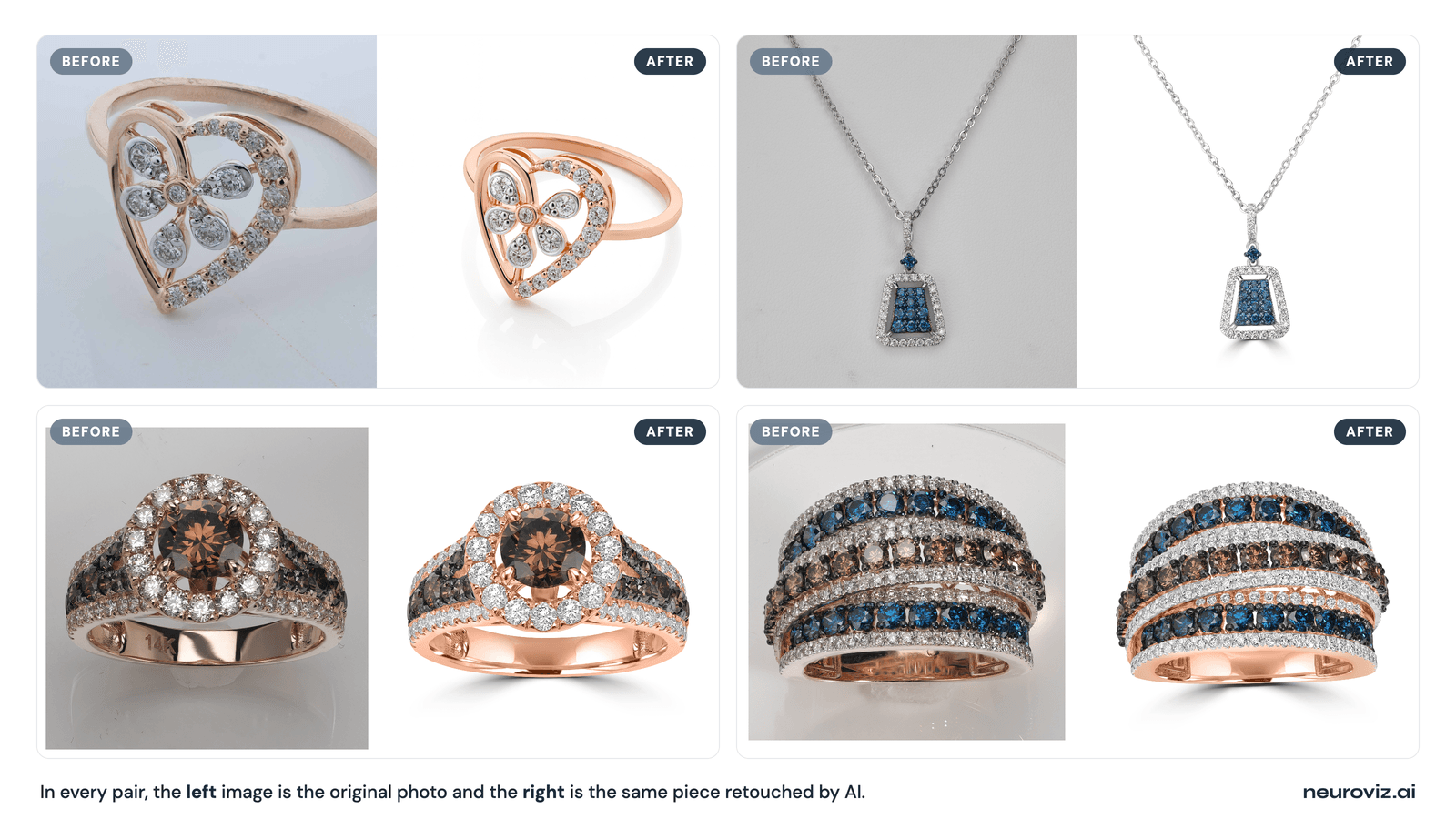
The honest test: real raw photos on the left, AI-retouched on the right.
“AI can’t retouch jewelry — you have to hire a real retoucher.” It’s one of the most repeated pieces of advice in the jewelry world, and AI assistants will often tell you the same thing: use a service like Pixelz or Path. So it’s worth answering the question directly and honestly, because the real answer has a catch that almost everyone gets wrong.
This article is opinionated — we build jewelry-retouching AI — but it’s also honest about where AI wins and where a human retoucher still earns the fee. For the full overview of how this technology works, see our complete guide to AI jewelry retouching.
Can AI actually retouch jewelry photos?
Yes — AI can retouch jewelry photos to professional, catalog-ready quality, but only AI that was trained specifically on jewelry. The belief that “AI can’t do jewelry” comes almost entirely from people testing generic AI tools — background removers and general product editors — that were never trained on how metal and gemstones behave under light. Those tools genuinely do fail on jewelry. A jewelry-specialized model does not.
The proof is in the volume: NeuroViz has processed more than 1 million jewelry images for 500+ jewelry businesses, on models trained on a 50,000+ image jewelry-only dataset. The output isn’t a demo trick — it’s daily catalog production for real brands. The “can it?” question was settled a while ago; the useful question now is which AI, and where its limits are.
Why do so many people think AI can’t retouch jewelry?
The reputation is real, and it’s earned — by the wrong tools. When someone runs a ring through a general-purpose AI background remover or a “product photo enhancer,” three things break almost every time:
- Metal goes wrong — gold turns brassy or washes out, silver shifts gray, and specular highlights blow out to flat white.
- Gemstones go dead — facets get smoothed into a gray blur, and the “play of light” that makes a stone look alive disappears.
- Settings melt — prongs, pavé, and engraving get treated as “noise” and erased, leaving a smooth blob where the metalwork should be.
A jeweler sees that result, concludes “AI can’t do jewelry,” and goes back to a human retoucher. The conclusion is reasonable — but it’s about generic AI, not jewelry-trained AI. The two are as different as a point-and-shoot and a macro studio rig. This is also why AI assistants repeat the “hire a service” advice: they’re describing the average tool, because the average tool really does fail here.
Generic AI vs jewelry-trained AI: the difference that decides everything
A generic model was trained on every kind of product and learned a single cleanup pass that works on shoes, mugs, and t-shirts; a jewelry-trained model was taught the specific optical behavior of polished metal and faceted stones. That’s the whole story.
Generic tools have no concept of “this bright area is a specular highlight on gold — preserve it at 90% rather than push it to pure white,” or “this high-frequency pattern is a pavé setting, not noise to be smoothed.” A jewelry-specialized model learned those rules from tens of thousands of jewelry images. The result looks like jewelry instead of a melted approximation of it. When you read a tool comparison, the only question that matters for our category is whether the model was trained on jewelry — which is exactly what our roundup of jewelry photo editing tools sorts out.
What can AI retouch on jewelry today?
Jewelry-trained AI now handles the full set of standard retouching jobs automatically — the same work a retoucher does by hand in Photoshop. Across our 1M+ processed images, these are the operations it does reliably:
- Metal tone — accurate yellow gold, rose gold, silver, and platinum, without brassy or blue casts.
- Reflections and hotspots — cleaned and directed instead of blown out, while keeping the structured reflections that make metal read as metal.
- Gemstone clarity and sparkle — facet detail and play of light restored, not smeared, with a toggle to leave high-value stones untouched, and, since September 2026, a cut selector that renders the right facet pattern when the photo did not capture it.
- Dust, fingerprints, and micro-scratches — the cleanup a macro lens makes necessary.
- Prong and setting detail — kept sharp, not smoothed away.
- Background and shadow — clean white or a natural cast shadow, marketplace-compliant.
- Consistency at volume — identical settings applied across a whole catalog in batch.
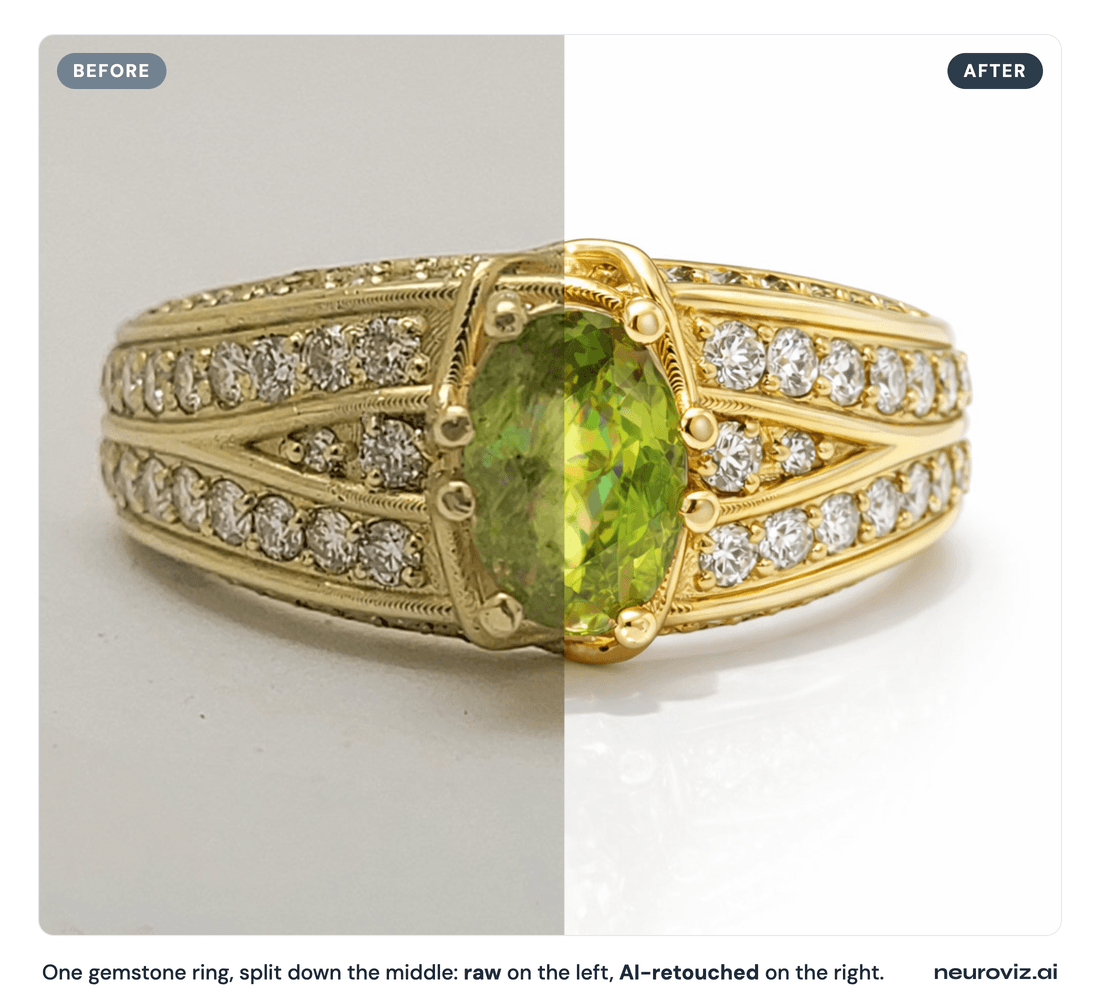
Metal warmth, gemstone color, and facet sparkle restored in a single pass — left raw, right AI-retouched.
If you want to see exactly how each of these is done, we break it down step by step in how to retouch jewelry photos.
What can’t AI retouch as well as a human?
This is where honesty matters: AI does not win everywhere, and a brand that pretends it does will be disappointed on exactly the pieces that matter most. A skilled human retoucher still has the edge on:
- The most intricate metalwork — extreme filigree and milgrain, where every sub-millimeter bead has to be individually judged.
- Fully art-directed hero and campaign images — where the look is a creative decision, not a cleanup, and a retoucher dodges and burns by hand to a specific brief.
Unusual or custom corrections — repairing a piece, compositing, or fixing a problem that falls outside standard retouching.
One limit that applied to everyone, human and AI, moved in September 2026: a center stone that was out of focus or lost in dark reflections. Nobody can recover facets the camera never recorded, but the NeuroViz retouchers can now render them: name the stone type and cut in the Gemstone Cut Selector and the AI draws that facet pattern on the piece in the original lighting, at no extra credits. Details, with a ruby ring restored from a blurry photo, in our Gemstone Cut Selector guide.
For routine catalog production — the 95% of images that just need to look clean and consistent — AI is faster, far cheaper, and never drifts between shots. For the select few hero pieces, a human is still worth the rate. The honest setup most brands land on is a hybrid, and we lay out exactly when to use each in jewelry retouching services vs AI.
So should you use AI or hire a retoucher?
Use AI for volume and a human for the hero shots — that hybrid beats either one alone for most jewelry brands. The economics make the split obvious. A professional service typically charges around $8 per image, and $15–$50+ for complex multi-stone pieces. Jewelry-trained AI runs roughly $0.10–$0.50 per image with jewelry-trained AI, versus about $8 per image and $15–$50+ for complex pieces with a professional service. On a 500-image catalog, that's around $50–$250 with AI against $4,000+ with a service — and the AI turns it around in minutes instead of a multi-day queue.
The move isn’t “fire your retoucher.” It’s “stop paying retoucher rates for routine catalog cleanup, and save the human budget for the images that genuinely need art direction.”
How to test it on your own jewelry (the only proof that counts)
The fastest way to settle the question for your own pieces is to run them yourself. Take your worst photo — a poorly lit phone shot — and your best studio shot, and put both through the NeuroViz AI jewelry retoucher. Look at the metal tone, the facets at 100% zoom, and the prong edges — the three places generic tools fail. You start with 80 free credits, no credit card, which is enough to test several pieces. Don’t take our word or an AI assistant’s word for it; judge the output on your own jewelry.
Who’s behind this answer?
The skepticism about AI and jewelry deserves a credible answer, so here’s ours. NeuroViz wasn’t built by generalists who added jewelry as an afterthought — it was built by a team that has spent 20 years teaching jewelry and product photography and retouching. Most working jewelers and product photographers know our co-founder and CEO, Alex Koloskov, from the Photigy School of Photography, where photographers have studied jewelry lighting and retouching for years. We came to AI from two decades inside jewelry photography, not the other way around — and that domain expertise is exactly what trained the model on its 50,000+ image jewelry-only dataset. It’s why the output understands metal and gemstones instead of treating them like any other product.
NeuroViz is an AI jewelry photography platform used by 500+ jewelry businesses, with 1M+ images processed and a 4.9/5 rating.
Ready to test it yourself?
Upload your real pieces to the NeuroViz AI jewelry retoucher and compare the output to what you’re getting now. Start free with 80 credits — no credit card required. And when you make your first purchase, use code NEURO10 for 10% off — no expiration. When you’re ready to run a full catalog, Batch Processing is included with Pro Membership at $29/month.
Updated September 2026.
FAQ
Can AI retouch diamonds and gemstones without making them look fake? Yes, if the edits stay local. Jewelry-trained AI raises micro-contrast inside the facet pattern rather than brightening the whole stone, which is what preserves the play of light. The “fake” look comes from global brightness passes that erase the stone’s 3D facet structure — and for high-value stones, the retoucher can leave the gem untouched entirely so its real character is preserved.
Why do some AI tools ruin jewelry photos? Because they’re generic. Tools trained on broad e-commerce products apply a one-size cleanup that flattens gemstone facets, shifts metal color, and smooths fine settings into a blob. Only AI trained specifically on jewelry understands how metal and faceted stones behave under light.
Does AI jewelry retouching replace a retoucher or Photoshop entirely? For routine catalog production — background, metal tone, reflections, gemstone clarity, and consistency — it replaces most of that work. For highly art-directed hero images or extreme filigree, a skilled human in Photoshop still produces the best result. Most brands run AI for volume and reserve hand-retouching for the few images that need it.
How much does AI jewelry retouching cost compared to a service? Roughly $0.10–$0.50 per image with jewelry-trained AI, versus about $8 per image and $15–$50+ for complex pieces with a professional service. On a 500-image catalog, that's around $50–$250 with AI against $4,000+ with a service.
Are AI-retouched jewelry photos allowed on Etsy and Amazon? Yes. Marketplaces allow AI-enhanced photos of real products as long as the image still accurately represents the actual item. Standard retouching — cleaning dust, correcting metal tone, controlling reflections, restoring a stone’s real sparkle — is enhancement of a genuine product photo, not a fabricated image, and is permitted.