AI Built for Jewelry Creative Teams

Creative Jewelry Photography Stunning Scenes Without a Photoshoot

Four AI tools that turn your existing jewelry — or even a hand-drawn sketch — into magazine-quality lifestyle, editorial, and concept imagery in under a minute. No studio, no stylist, no shoot day required.

  • No credit card required
  • First scene in under 60 seconds
  • Commercial license included
500+
Jewelry brands
4
Creative tools
$0.30
From per image
4.9/5
Customer rating
60s
Avg. generation time

What You Can Create With AI Jewelry Photography

AI jewelry photography isn't a single style — it's a creative range. NeuroViz lets you build the scene you actually need, from clean editorial to surreal art-direction, in four workflows tuned for jewelry's hardest edge cases.

  • Lifestyle scenes — jewelry on natural textures, soft daylight, warm tones. Perfect for Etsy, Instagram, lookbooks.
  • Editorial scenes — dramatic lighting, props, surreal composition. Magazine-grade imagery.
  • Studio art-direction — clean compositions on marble, velvet, water. Catalog-grade.
  • Concept visualizations — render your sketches into photoreal jewelry before manufacturing.
  • Marketing campaigns — Instagram ads, Pinterest pins, banner backgrounds, holiday series.
  • Variation previews — show clients the same piece in different metals or gems without making a sample.

How Our AI Creative Jewelry Photography Software Works
(3 Steps, Under a Minute)

Whether you're styling existing pieces or rendering a concept, the flow is the same: bring something visual, describe what you want, and the AI builds the rest in seconds.

1

Upload Jewelry or a Sketch

Drop in a photo of your existing piece — or a hand-drawn / digital sketch if you're visualizing a new design. Add a second piece if you want a coordinated styled shot.

2

Describe the Scene

Type a one-line prompt ("luxury marble surface, golden hour light"), upload a reference image to set the mood, or leave blank and let the AI compose automatically. Any language works.

3

Generate the Creative Scene

Your styled jewelry photograph is ready in 30–60 seconds at up to 4K resolution, with a full commercial license. Use it on your website, ads, social, lookbook, or print catalog.

Four Creative Jewelry Photography Tools — Pick by Job

Different creative jobs need different tools. NeuroViz built four — two for styling existing jewelry, one for rendering sketches and concepts, and one for previewing variations of an existing piece without re-manufacturing.

Creative Photographers — Style Your Existing Pieces
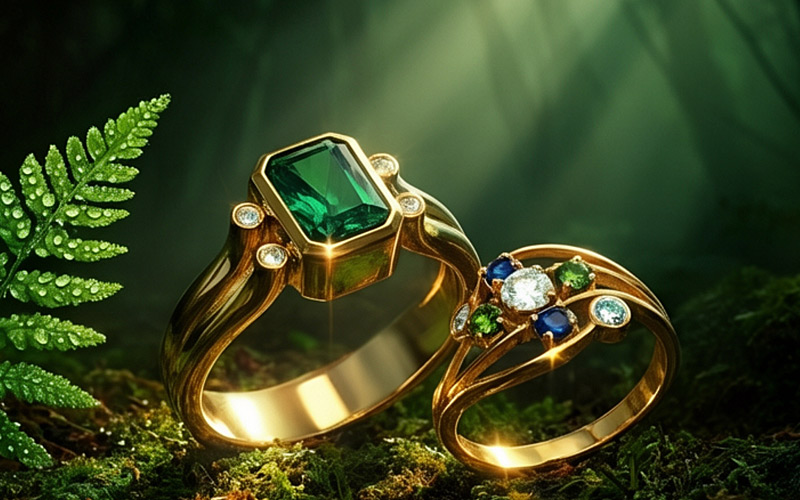
Creative Jewelry Photographer Vivid example — emerald and sapphire rings in a dramatic forest editorial scene
Recommended · Vivid

Creative Jewelry Photographer Vivid

Magazine-quality scenes from any product photo.

The newest creative photographer model. Upload your jewelry, optionally drop in a background reference, and the AI composes a complete styled scene with proper lighting, accurate metal reflections, and atmospheric depth. Improved scene generation over V1 — better consistency, better materials, better light.

Best for: Marketing teams, e-commerce art-directors, brands needing magazine-quality styled shots without a studio.

Pro TipAlways add a background reference image — it dramatically improves scene consistency. Combine up to 2 jewelry pieces for coordinated styled shots.

20 credits per image · ~$0.40

Try Photographer Vivid Free →
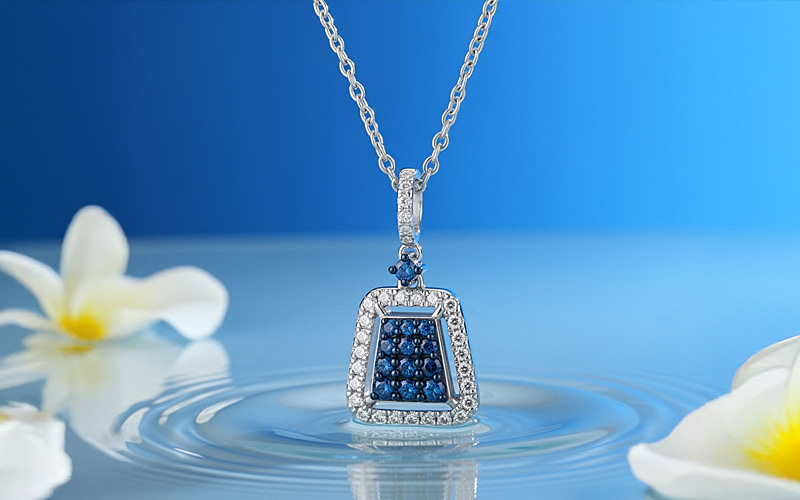
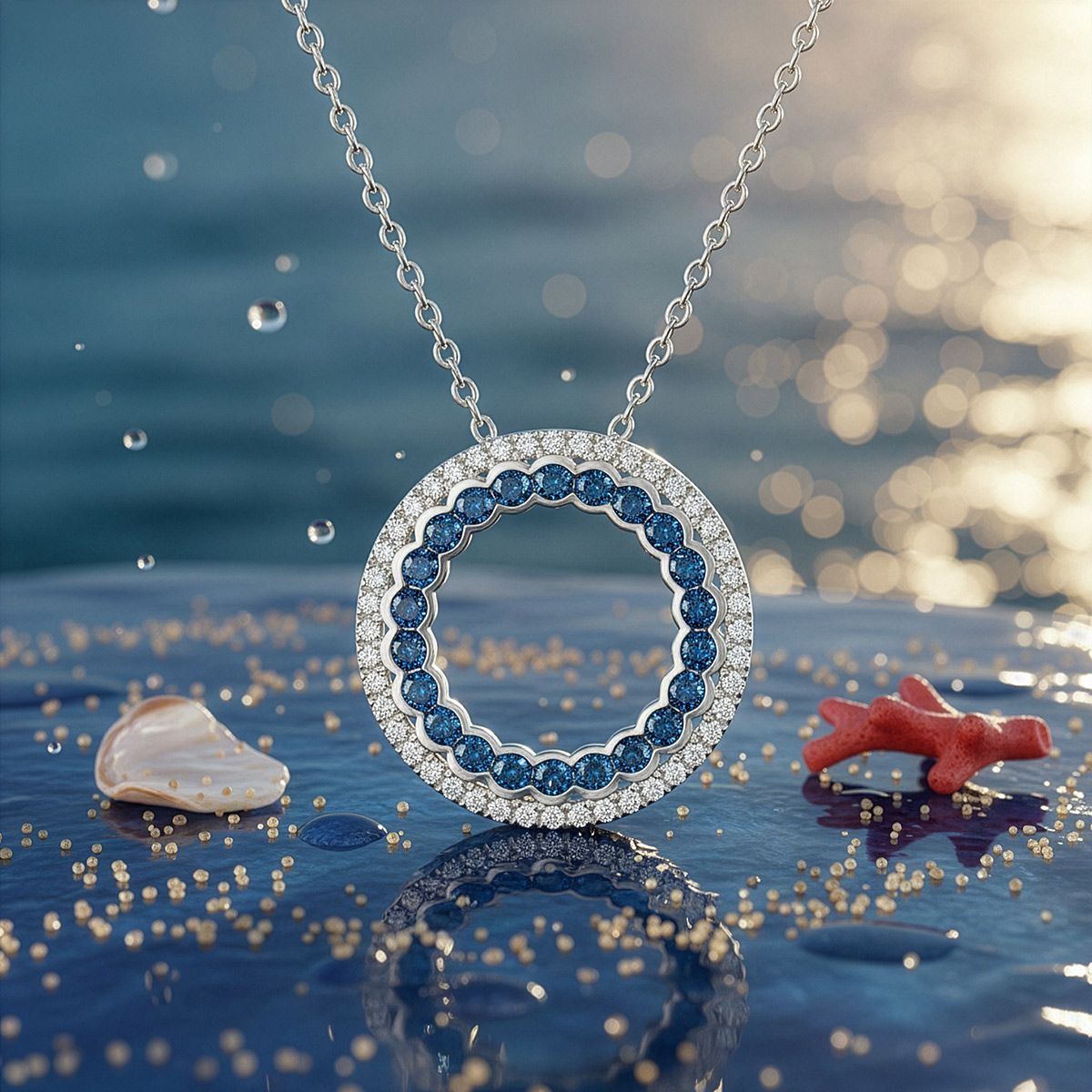
Creative Jewelry Photographer V1 example — sapphire pendant in a clean lifestyle water scene
Original · V1

Creative Jewelry Photographer V1

Original creative photographer — distinct aesthetic.

The original creative photographer. Analyzes your jewelry and applies styles from reference images while preserving exact details. Some teams prefer V1's aesthetic for certain editorial moods — both versions are kept on the platform so you can A/B test.

Best for: Editorial-leaning shoots, alternative aesthetic compared to Vivid, A/B testing styled output.

Pro TipAll input photos (jewelry + reference) must be high quality. For rough source shots, run them through AI Retoucher first — V1 won't fix bad source.

20 credits per image · ~$0.40

Try Photographer V1 Free →
Design Tools — Sketch to Render & Modify Variations
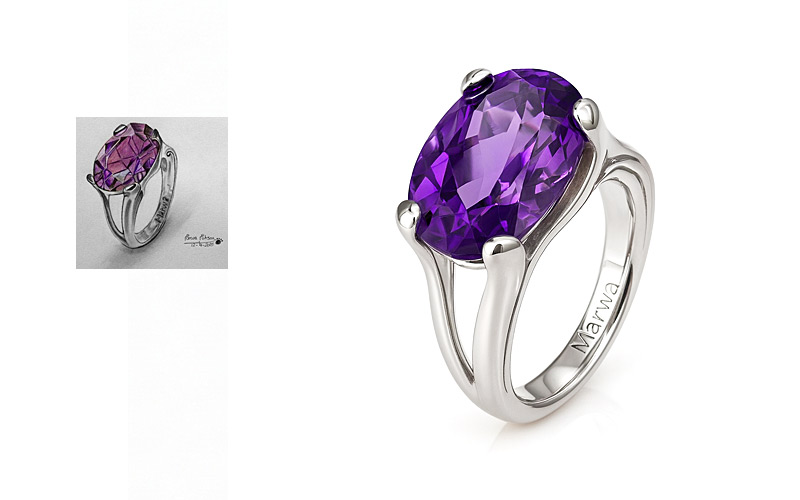
Jewelry Design Visualizer example — sketch rendered into a photorealistic amethyst ring
Sketch to Render

Jewelry Design Visualizer

Turn sketches into photorealistic jewelry renders.

Upload a hand-drawn or digital sketch on a white background, describe the metals, gemstones, and finishes, and the AI generates a photorealistic render with accurate material properties, gemstone facets, and lighting. Show clients exactly what a piece will look like before manufacturing.

Best for: Custom jewelers, fine jewelry brands, client-facing presentations, pre-production visualization, designers exploring concepts before committing to production.

Pro TipSketch must be at least 200px on the longest side, white background. The more detailed the sketch — proportions, gemstone placement, metal type — the more accurate the render. Always describe the materials explicitly in the prompt.

15 credits per image · ~$0.30

Try Visualizer Free →
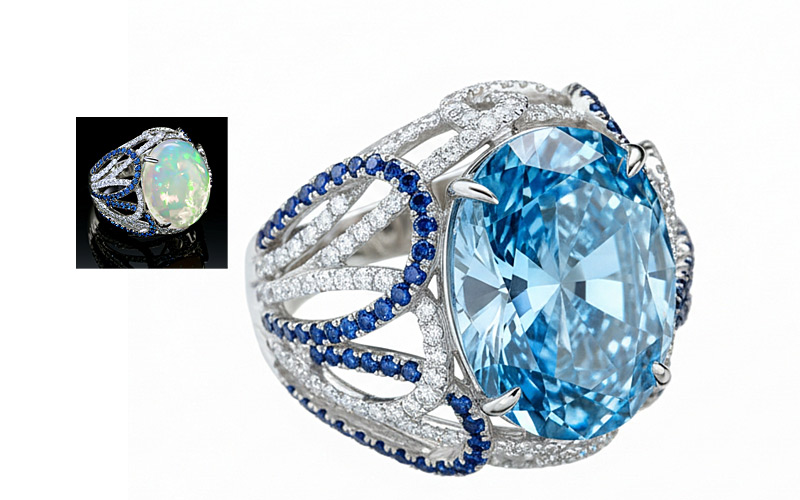
Jewelry Modifier Pro example — same ring shown in two color and gemstone variations side-by-side
Variations

Jewelry Modifier Pro

Change colors, swap gems, modify materials.

The variation tool. Take an existing jewelry photo and modify it via text — change gold to silver, swap a ruby for an emerald, switch matte to high-polish, restyle the background. Lets you show clients variations of the same piece without manufacturing samples.

Best for: Custom jewelers showing clients alternate metals/gems, retailers previewing collection variants, manufacturers planning SKU expansions.

Pro TipBe explicit in your prompt — "change gold to platinum, swap ruby for emerald, matte finish". This is a modifier, not a text-to-image tool — it works on your existing photo.

20 credits per image · ~$0.40

Try Modifier Pro Free →

Where Creative Jewelry Scenes Get Used

Most NeuroViz creative jewelry photography output ends up in one of these six places. Each is a regular, repeatable workflow our customers run weekly or monthly.

  • Instagram & Pinterest content. Generate a season's worth of styled posts in one afternoon. Vary mood, palette, and styling without booking a stylist.
  • Marketing campaigns and paid ads. Meta, Google Shopping, TikTok creatives — produce 10 styled variants per piece for A/B testing.
  • Lookbooks and catalogs. Build a 30-page seasonal lookbook in an afternoon, full commercial license, no copyright headaches.
  • Website hero images and banners. Refresh hero imagery without quarterly photoshoot budgets. Test five moods, pick the converter.
  • Design concept presentations. Show clients a photoreal render of a piece you haven't manufactured yet. Sketch → render → approval → production.
  • Holiday and seasonal campaigns. Christmas, Valentine's, summer florals, autumn earth-tones — restyle the same piece for each calendar moment.

Photographer vs Visualizer vs Modifier — Pick the Right Tool

Three different jobs. Three different tools. Use this decision flow to pick the right one in 5 seconds.

You have… You want… Use this
An existing jewelry photo A styled creative scene Creative Jewelry Photographer Vivid (or V1 for a different aesthetic)
A hand-drawn or digital sketch A photoreal render Jewelry Design Visualizer
An existing piece The same piece in different metals or gems Jewelry Modifier Pro
A rough phone photo A clean catalog version AI Retoucher (different page)
A product photo The same piece on a model Virtual Try-On (different page)

Quick rule: Photographer = style what you have. Visualizer = render what you sketched. Modifier = vary what you have.

Creative Jewelry Photography Pricing

Pay only for what you use. Different tools have different per-image costs based on the AI model size and processing power. No subscription required.

Per Image

ToolCreditsCost
Creative Photographer Vivid20$0.40
Creative Photographer V120$0.40
Modifier Pro20$0.40
Design Visualizer15$0.30

Credit Packs

PackPriceCredits
Trial+$10250
Starter$501,500
Business$2008,000
Pro Membership$29/mo+ API access
Start Free — 80 Credits, No Credit Card

Or see full pricing →

Frequently Asked Questions

What kinds of scenes can I create with AI jewelry photography?
Anything you can describe. Lifestyle (jewelry on natural fabrics, in soft daylight), editorial (dramatic light, props, surreal composition), studio art-direction (marble, velvet, water surfaces), holiday and seasonal mood, abstract concept work — the AI builds whatever scene you describe in plain English (any language). Combine with reference images for tighter creative direction.
Can I describe a custom scene in my own words?
Yes. Every NeuroViz creative jewelry photography tool accepts free-text prompts in any language. Describe materials, finishes, mood, lighting, props, environment, color palette — whatever matters. For best results, pair a text prompt with a reference image so the AI can match both the description and the visual mood.
Will the jewelry look exactly like my original piece?
The Creative Photographer tools preserve your jewelry's exact details — metal tone, gemstone color, prong setting, engraving — while styling the surrounding scene. The Modifier tool intentionally changes specific things you ask it to (e.g. swap the gemstone). The Visualizer tools render from your sketch so they follow the sketch shape; you describe materials in the prompt. Use the right tool for the job and your jewelry stays accurate.
Can I use these images commercially on Etsy, Amazon, ads, lookbooks?
Yes. Every image generated by NeuroViz includes a full commercial license. Use them on Etsy, Amazon, Shopify, paid ads (Meta / Google / TikTok), social posts, printed catalogs, lookbooks, billboards, and brand campaigns — without paying additional licensing fees. Your photos are processed in isolation and never used to train AI models.
Which Creative Jewelry Photographer should I pick — V1 or Vivid?
Vivid is the newer model with improved scene generation, better material rendering, and more consistent lighting — start there for most projects. V1 produces a slightly different aesthetic that some teams prefer for editorial work, so we keep both. Try both with the same input on your free 80-credit trial and see which fits your style.
Is this for existing jewelry or new designs I haven't made yet?
Both. The Creative Photographer tools and Modifier work on existing jewelry photos. The Design Visualizer tools work from sketches and concept drawings — so you can render a new design and show it to a client before manufacturing. Some workflows chain them together: sketch → Visualizer render → Modifier variations → Photographer for the final styled shot.

Start Building Creative Jewelry Scenes Today

Photoshoots, stylists, and studio rentals used to be the only path to magazine-quality jewelry imagery. Now it's 60 seconds and a few dimes per scene. 500+ jewelry businesses already made the switch — try it on your worst photo.

No credit card. No subscription. First creative scene in under a minute.

Start Free — 80 Credits