Jewelry Price Changer: Update Product Prices in Seconds
We built a tool that changes prices on jewelry product photos automatically.
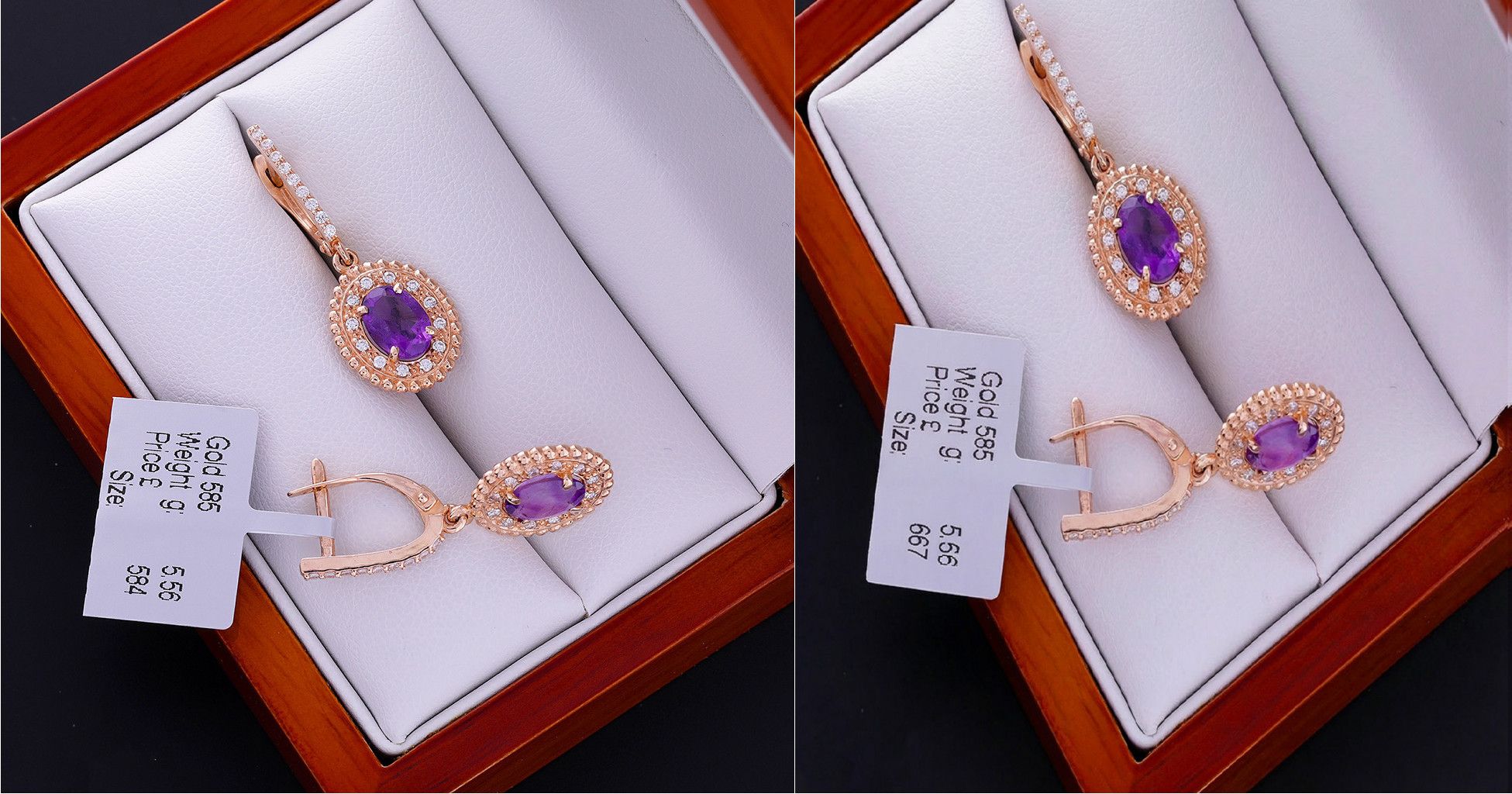
Upload image with price tag. Enter new price. Generate. Done.
No Photoshop. No manual editing. No designer needed.
The Problem
Jewelry prices change. Gold prices fluctuate. Metal costs vary. You need to update prices on product photos.
Traditional approach:
- Open Photoshop
- Manually edit price tag
- Match fonts and colors
- Align text properly
- Save new version
- Repeat for every product photo
This takes time. Requires design skills. Scales poorly when you have 50 products with price changes.
How Jewelry Price Changer Works
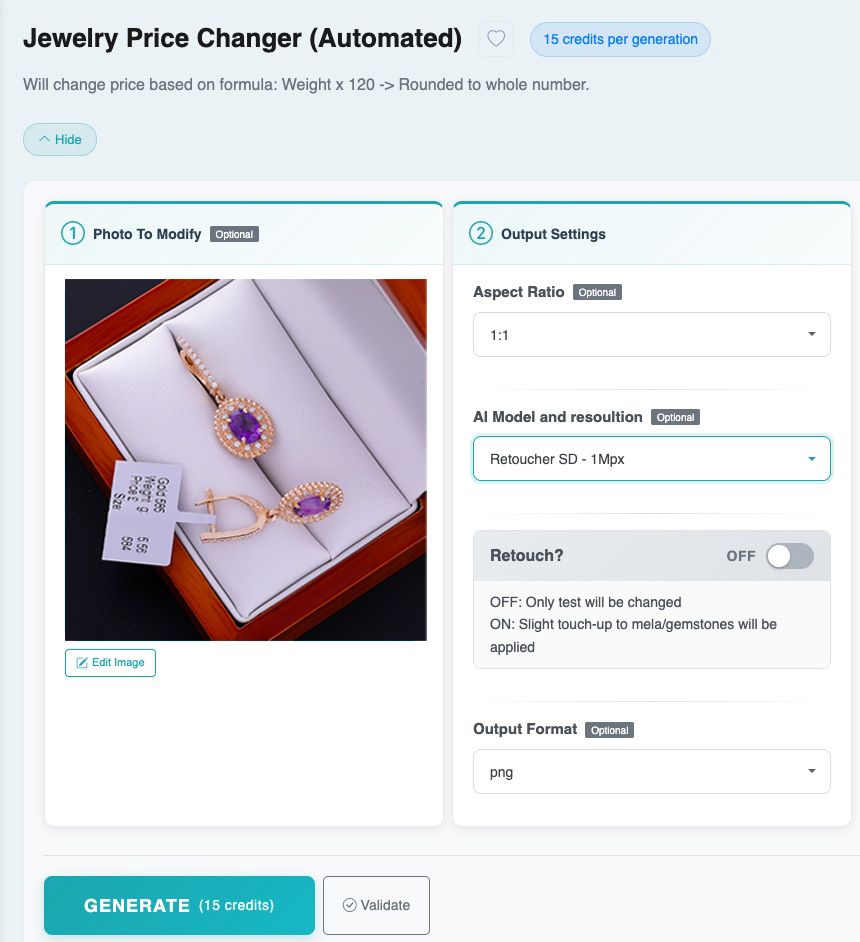
- Step 1: Upload Image
- Upload your jewelry product photo with visible price tag. The image should clearly show the current price.
- Step 2: Generate New Price
- Click “Generate”. The AI detects the price tag. Changes the price automatically.
- Current Version – Automatic Calculation:
- Right now, the price calculation is automatic. The formula: Weight × 120 (rounded).
- This works for jewelry priced by weight. The AI reads weight from the image. Calculates new price. Updates the price tag.
Step 3: Download Updated Image
- Download your product photo with updated price. The price tag matches original style, font, and positioning.
Coming Soon – Custom Formulas:
We’re adding custom formula support. You’ll be able to enter your own pricing logic.
Examples of custom formulas you’ll be able to use:
- Weight × [your rate] + [fixed markup]
- Different rates for gold/silver/platinum
- Percentage-based markups
- Volume discounts
- Regional pricing variations
Custom formulas launch Q1 2026.
Use Cases
Precious Metal Price Changes:
- Gold price fluctuates. Your pricing formula stays consistent (weight-based), but the rate per gram changes. Update all product photos with new rates automatically.
- Upload 50 ring photos with old prices. Generate with new formula rate. Download 50 updated images.
Seasonal Pricing:
- Holiday sales. Discount campaign. Promotional pricing. Change prices on all product photos for campaign duration.
- Revert to original prices after campaign ends. Same process, different formula.
Multi-Market Pricing:
- Same products, different markets, different pricing. Generate separate image sets with region-specific prices.
- Upload master image set. Generate with Formula A for Market 1. Generate with Formula B for Market 2. Different price tags, same product photos.
Inventory Repricing:
- Regular price updates based on market conditions. Batch update all product photos. Keep product photography current without reshoots.
What Gets Updated
- Price Tag Only: The AI changes only the price tag on the image. Everything else stays identical:
- Product photography unchanged
- Lighting preserved
- Background maintained
- Product positioning identical
- Only the price number changes.
- Style Matching: The new price tag matches original style:
- Same font
- Same color
- Same size
- Same positioning
- Same background
- The updated price looks like it was always there.
Current Limitations
- Fixed Formula: Right now, you can’t customize the pricing formula. It’s weight × 120 for all generations. This works if your pricing follows this formula. Doesn’t work for fixed-price items, percentage markups, or complex pricing logic. Custom formulas coming soon.
- Weight Detection: The AI needs to detect weight from the image or metadata. If weight information isn’t visible or available, automatic calculation won’t work.
- Price Tag Visibility: The price tag must be clearly visible in the image. Partially obscured or very small price tags may not update correctly.
Who This Helps
- Weight-Based Pricing: Jewelers who price by weight (gold/gram, silver/gram). Your pricing formula is weight × rate. When rates change, update all photos automatically.
- High-Volume Catalogs: Retailers with large inventories. Hundreds of product photos. Regular price updates needed. Manual editing doesn’t scale.
- Multi-Channel Sellers: Same products on multiple platforms. Different pricing for each channel. Generate separate image sets with platform-specific prices.
- Seasonal Campaigns: Promotional pricing periods. Update prices for campaign. Revert after campaign ends. Automate the process.
Future: Custom Formulas
- Custom formula support launches Q1 2026. You’ll enter your pricing logic directly.
Planned Formula Options:
- Basic arithmetic: (weight × rate) + markup
- Conditional logic: If gold, use rate A; if silver, use rate B
- Percentage-based: original_price × 1.20 (20% markup)
- Tiered pricing: Different rates for different weight ranges
- Regional multipliers: base_price × regional_rate
Formula Interface:
- Enter formula in simple text format. System validates formula. Shows preview with sample calculation. Save formula for repeated use. More details announced when feature launches.
Technical Notes
- Image Quality: Original image quality preserved. No compression artifacts added. Price tag update doesn’t degrade photo quality.
- File Format: Supports standard image formats (JPG, PNG). Output format matches input format.
- Batch Processing: Works with batch processing for volume updates. Upload 100 images. Apply same formula. Download 100 updated images.
Getting Started
Requirements:
- Product photos with visible price tags
- Weight information visible or available
- Currently works best with weight-based pricing
How to Use:
- Open Jewelry Price Changer application
- Upload product photo with price tag
- Click “Generate”
- Download updated image
Current Version: Uses automatic formula (weight × 120). Custom formulas coming Q1 2026.
Pricing
- Standard credit cost per generation. Same as other image generation applications.
- Batch processing available for volume updates (Pro Plus and Agency plans).
When Custom Formulas Launch
- We’ll announce custom formula feature when it goes live. You’ll be able to:
- Save multiple formulas
- Name formulas for different use cases
- Apply different formulas to different product categories
- Preview calculations before generating
- Expected launch: Q1 2026.
Start Using Price Changer
- Available now in your dashboard. Look for “Jewelry Price Changer” in applications list.
- Currently supports automatic weight-based pricing. Custom formulas coming soon.
Questions? Contact support@neuroviz.ai